GPIB Communicator
This little program lets you connect
to up to 14 devices on a GPIB bus and manually talk to one at the time.
When started it scans the bus for
devices and configures itself. By default there's a list of common commands
which could be added to, deleted from, saved and recalled in different ways.
You can save a reply from a device directly to a file and also send a file back
to a device - handy if you want to save for example an instrument setup and
later set up the instrument (or another)
the same way. There's a syntax
error check utility with two different ways of checking. I haven't tried it on
other than Tektronix instruments, however I believe alternative 2 is standard
and will
work on
later models of other brands too.
February 17, 2025 - New version 2.1
Changes
from 2.0 to 2.1:
New:
A short splash screen
at start of the stand alone version added.
Change:
All original VB6
message boxes, which always open at center screen, were replaced by a better
version that opens at center of owner form instead.
Changes
from 1.91 to 2.0:
Bugfix:
Reply to query to confirm
choice to set CAPS on or off was disregarded, now removed.
Changes:
Changed
so Send button and Outgoing Message list are disabled while Help is shown.
Changed
default folder of Message (x.gmg) and Data (x.dat) files from the program folder to
an AppData folder
Changed
Show Data File from being shown on the Meassage List to open with Notepad (or other default app
for x.dat files).
Help text slightly changed.
New:
Added
Main Menu item About and About form with Check for Update button.
Added
Exit button and removed the control buttons at top right.
Changes from 1.90 to 1.91:
Changes:
Opening Outgoing Message dropdown list always started with a blank on
Outgoing Message box, now it shows the selected item.
Warning message for restoring the Default Message list changed.
New:
Option to select next outgoing
message after send added. Convenient if you have a sequence of commands that you
want to send one at the time.
Changes from 1.83 to 1.90:
Bugfixes:
Runtime Error if Restore Default Outgoing Message List was done and the file was write protected.
Back color of the X button didn't always match the back color of the rest of the buttons.
X button could be enabled even when there is nothing to delete (Help selected or device selected when more than 1 device is present).
Save query was issued at exit when an Alternative Outgoing Message list had been loaded and no changes had been done.
Unsent Outgoing Message couldn't be deleted with X.
Changes:
Settings saved in registry rather than in a file.
Order of some Menu items changed.
Warning message when loading an Alternative Outgoing Message file now only shows up if changes were done to the current Outgoing List.
Most Warning messages text and when they appear changed.
Behaviour of the dropdown list for Outgoing Messages changed so it won't revert to the first list item that equals a sent message (when multiple entries of the same messgae exist).
New:
Option to allow multiple entries of a command. When checked every command will be added to Outgoing Message List as opposed to only nonexisting commands when unchecked.
Label showing the name of then current Outgoing List file added.
Menu Item to show content of a data file added.
Changes from 1.82 to 1.83:
Bugfixes:
Outgoing Message box didn't get focus when an address button was clicked.
Changes from 1.81 to 1.82:
Bugfixes:
Double click on active addrss button to enable syntax checking didn't work. (Did work through menu though).
Changes from 1.8 to 1.81:
Bugfixes:
Outgoing message was highlighted and could easily be cleared by mistake at the following:
After a message was sent,
A selection from the dropdown list was made,
Incoming messages were cleared,
Del key was pressed, Note: a complete command can be cleared from the Outgoing Message by pressing Del but it will not be removed from the dropdown list. Only X button will do that.
Changes from 1.71 to 1.8:
Bugfixes:
Double question marks only (??) now doesn't send anything before expecting an input (used to send a zero string).
Runtime error if CAPS or Find Matching Commands was checked before any device is selected fixed.
Clearing Outgoing Message didn't disable Send.
Changes:
Changed timeout to 300 ms for ID.
Clear button renamed "Restore" and buttons Restore, Send and Clear slightly increased in width.
Deleting Outgoing Message Entry can now only be done with the X button and not Esc key.
When an Outgoing Message is deleted the next or previous item will be selected rather than a blank line.
Some minor changes in appearance.
New:
Added checkboxes to select ID query command (ID? and/or *IDN?). If both are checked (default) IDquery will first be ID? and if that fails next *IDN?.
A No response message was added if ID fail.
Added checkboxes to add CR and/or LF at the end of outgoing message. Default is none checked.
More Keyboard "ALT + key" shortcuts added.
Changes from 1.7 1to 1.71:
Changes:
Changed the dialogboxes when sending datafile to device so sending must be confirmed before the transfer.
Changed so the checkbox for finding matching text in the Outgoing Message list while typing is unchecked by default.
Changes from 1.6 1to 1.7:
Changes:
Some text has been changed.
A few internal changes.
New:
Added a checkbox to enable/disable upper case text only in the Outgoing Message box.
Added a checkbox to enable/disable finding matching text in the Outgoing Message list while typing.
Added a function, in the File menu, to send a datafile to a selected device.
Changes from 1.6 to 1.61:
Bugfixes:
A limit of 7 devices that was used for testing of v1.6 was mistakenly left and now corrected.
A minor bug concerning how the Send button was enabled fixed.
A couple annoying misspellings fixed.
Changes from 1.5 to 1.6:
Bugfixes:
A couple of possible Run Time Errors fixed.
Changes:
Decreased number of possible devices to 14 to comply with standard.
Increased size of Outgoing Message box so longer commands could be viewed.
Save message file on exit always done to the default file fixed so it is now saved to the current file.
Several internal procedures changed.
New:
Button added so ID from all connected devices could be captured in just one click.
A couple of Menu items added.
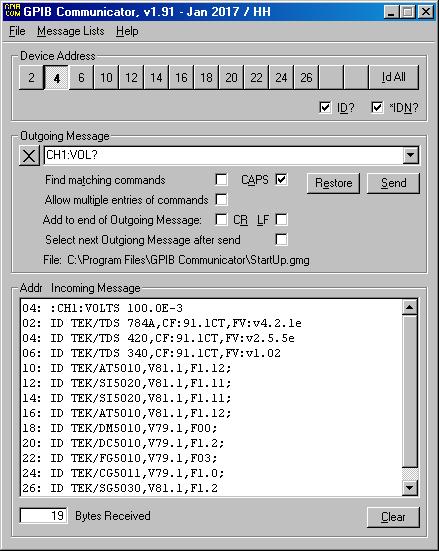
Here's a screen shot:
Even though it doesn't do very much it could be very useful if you want to try out commands and/or figure out the syntax which sometimes could be complex or for some other reason communicate
manually with GPIB devices and with the file utilities you could easily send data like setups and waveforms between the PC and a device.
Most of the time a questionmark at the end of a sent message will tell an instrument to send a reply and the program to receive the reply. However some instruments don't need or want a questionmark
to send and if so two questionmarks at the end will tell the program to receive and no questionmark will be sent to the instrument.
Known Isssue:
The program does not support GPIB address 0. It will find a device with address 0 on the bus but it will not configure itself correctly and not be able to connect correctly to any device on the bus.
Workaround: Don't use address 0 on any device on the bus.
You must have a NI GPIB card with the correct drivers installed. Find and download National Instruments GPIB card drivers here.
It is expected to work on any PC/win OS (not 3.1) with a correctly installed and working NI card.
Be sure to uninstall any previuos version before installing this one or extract the *.exe file from the *.CAB file and replace your current file.
Download
GPIB Communicator here. I recommend that you
uninstall any previous version before installing this one.
NOTE: Since the default path of .dat and .gmg
files changed with version 2.0 and you want to continue using any saved files
from 1.xx they must be moved from the GPIB Communicator folder in
C:\Program Files (x86) to same folder in C:\Users\username\AppData\Roaming
folder. You may need to enable Show Hidden Files to see this folder or type the
path in the address field of File Explorer.
My original program that this one was developed from was a DOS application.
It could be downloaded here. Requirements are a working GPIB environment with DOS drivers and a device in GPIB config file named TEKDEV1.
Home / Go back